


Most screens emit blue light during the day and these blue lights keep us active, which might be problematic especially at night. Fortunately, many devices now offer Night Mode or Night Light settings to change the display hue from blue to a warmer tint.
There’s a high possibility you’re reading this on a device that gives off blue light. People are spending more and more time than ever in front of screens. That being said, should you worry about the blue light coming into your eyes?
What is blue light?

The world is full of electromagnetic energy, constantly moving in waves around us and through us.
Different waves are of different lengths, with:
- Microwaves and radio waves
- UV waves and infrared waves
- The electromagnetic spectrum is made up of:
X-rays gamma rays
The majority of electromagnetic waves can’t be seen. But the human eye can see a small band of waves called visible light. Wavelengths of visible light range from 380 nanometers (violet light) to 700 nanometers (white light) (red light).
Enable and Schedule automatically Night Light or Night Mode
Click on “Start” and look for “Settings.”

Click on System, and then click on Display.
Right below the section on Brightness, you’ll see the Night Light option.
For the Schedule night light, you can now use a switch to turn it on. Click the arrow “>” to see more options, like “Sunset to sunrise,” “Set hours,” or “Custom times” for when the night light should come on and go off.
How Does Blue Light Harms Eyes?
Your eye has structures that keep light from getting in, and UV rays can hurt the light-sensitive retina at the back of your eye. On the other hand, your cornea and lens protect the retina from damage.
Blue light can’t get through these walls. And you’re exposed to a lot of it. The amount of blue light from the sun is much higher than the amount from any one device.
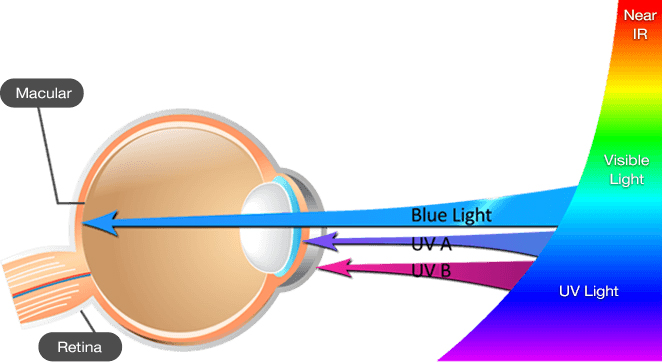
Still, some experts on eye health are worried about the blue light that comes from backlit digital screens and devices. This is because people use them so close to their faces so often.